
Call us now
08045813031

 Send Inquiry
Kinco HMI
Kinco HMI Specification
- Processor Type
- 32-bit RISC processor
- Connectivity Type
- RS232/RS485, USB Host, Ethernet (model-specific)
- Frequency
- 50/60 Hz
- Automation Grade
- Automatic
- Screen Size
- 7 Inch (Widescreen), 16:9 aspect ratio
- Cable Length
- Depends on model and installation
- Mounting Type
- Panel Mount
- Weight
- Approx. 0.9 kg
- Control Type
- Touch Screen
- Features
- High resolution touch display, multi-language support, data logging
- Remote Control
- Yes
- Application
- Industrial Automation, PLC Monitoring
- IP Rating
- IP65 (Front Panel)
- Phase
- Single Phase
- Material
- Polycarbonate (PC)/ABS Plastic
- Power
- 5W
- Temperature
- 0C to 50C (operating), -20C to 60C (storage)
- Voltage
- 24V DC
- Backlight Life
- 50,000 hours
- Touch Panel Type
- 4-wire Resistive
- Software Compatibility
- Kinco DTools software
- Expansion Slot
- SD Card Slot (model-specific)
- Brightness
- 400 cd/m2
- Relative Humidity
- 10% ~ 90% RH (non-condensing)
- USB Ports
- USB Host 2.0
- Viewing Angle
- Left/Right: 70/70, Up/Down: 50/70
- Display Resolution
- 800 x 480 pixels
- Response Time
- 3 ms
- Color Support
- 16.7M colors (True Color)
- Contrast Ratio
- 400:1
- Storage
- 128MB Flash, 64MB RAM
About Kinco HMI
KINCO make HMI Touchscreen Displays
MT4000 / MT5000 Series
- Programming Support
- Installation
- Commissioning
- Wiring
- Communication with all types of PLC ( Delta , Fatek , Siemens , Mitsubishi , Panasonic etc )
- Tracing
- Panel Design
- Recipe Design
- Production Trials onsite for End User Service & Support
- Integration with other Systems ( SERVO Motors & Drivers , STEPPER Motors & Drivers )
High-Resolution Display for Enhanced Visibility
Enjoy crisp visuals and vibrant colors with the Kinco HMIs 7-inch surface, offering a resolution of 800 x 480 pixels and support for 16.7 million colors (True Color). The wide viewing angles ensure clarity from various positions, while a front panel rated IP65 shields the screen against dust and splashes during industrial operations.
Reliable Performance in Demanding Environments
Designed with a long-life backlight ( 50,000 hours) and a resilient polycarbonate/ABS plastic enclosure, this HMI operates between 0C and 50C, withstanding harsh industrial settings. It processes commands swiftly within 3 milliseconds and maintains stable performance thanks to ample flash and RAM.
Flexible Connectivity and Easy Integration
The Kinco HMI accommodates diverse system architectures with RS232/RS485, USB Host 2.0, and model-specific Ethernet, alongside SD card slot expansion. Compatible with Kinco DTools software, it simplifies setup, control, and remote management, streamlining solutions for automation and monitoring tasks.
FAQs of Kinco HMI:
Q: How do I integrate the Kinco HMI into my industrial automation system?
A: Integrating the Kinco HMI involves connecting it via RS232/RS485 or Ethernet (depending on model) to your PLC or control equipment. Use Kinco DTools software for configuration and setup, ensuring that the HMI operates within the recommended voltage of 24V DC and mounting securely as a panel mount application.Q: What are the key benefits of using the Kinco HMIs high-resolution touch display?
A: The 7-inch 800 x 480 pixel display delivers sharp images and vivid true color (16.7M colors), making it easier to monitor and control industrial processes. Its resistive touch panel ensures responsive interaction, while multi-language support and data logging enhance operational efficiency and accessibility.Q: When should I consider upgrading the storage or connectivity options on the Kinco HMI?
A: Upgrade storage by inserting an SD card in models with expansion slots if your application requires extensive data logging or larger project files. Opt for Ethernet connectivity (if supported) for remote control or networked monitoring needs. USB Host 2.0 is available for device interfacing and data transfer.Q: Where is the Kinco HMI best utilized within industrial automation?
A: The Kinco HMI excels in environments requiring operator interfaces for PLC monitoring, machinery control, and automated system management. Its durable construction and IP65-rated front panel suit factory floors, manufacturing lines, and process control cabinets where reliability and clear visual feedback are paramount.Q: What process should I follow to maintain the Kinco HMIs operational reliability?
A: Ensure routine cleaning of the touch surface with non-abrasive materials, verify all panel mounts and cable connections, and operate within the specified temperature and humidity range. Periodically backup data and configuration through SD card or USB to prevent loss and support efficient troubleshooting.Q: How does the Kinco HMI support remote control and data logging functions?
A: Remote control is facilitated via compatible communication ports such as Ethernet or RS485, enabling monitoring and management from external systems. Data logging capabilities allow tracking of operational parameters and events, with storage expandable by SD card on applicable models for long-term record keeping.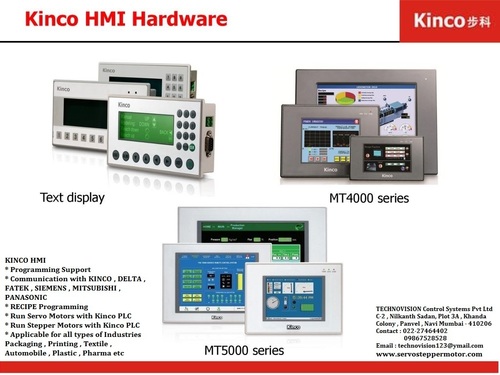
Tell us about your requirement

Price:
Quantity
Select Unit
- 50
- 100
- 200
- 250
- 500
- 1000+
Additional detail
Mobile number
Email

More Products in PLC HMI Controllers Category
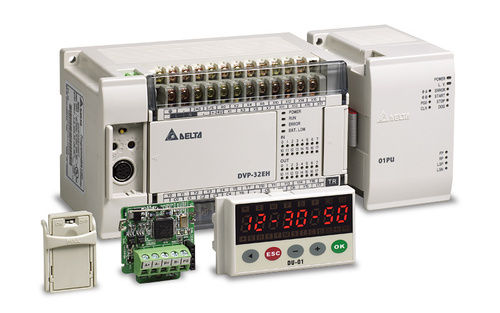
Delta PLC DVP80EH2
Automation Grade : High
Connectivity Type : Wired
Power : 24V DC
Mounting Type : DIN Rail Mountable
Warranty : 1 year
Application : Industrial Automation
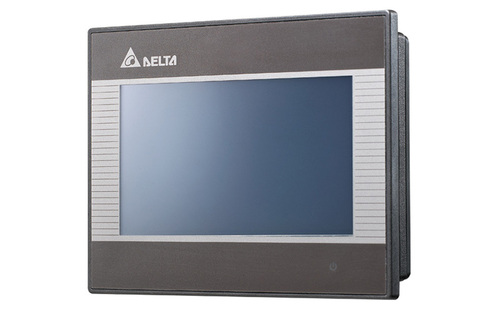
Delta HMI DOPB03E211
Automation Grade : High
Connectivity Type : Wired
Power : 24 VDC
Mounting Type : Panel Mounted
Warranty : 1 Year
Application : Industrial Automation
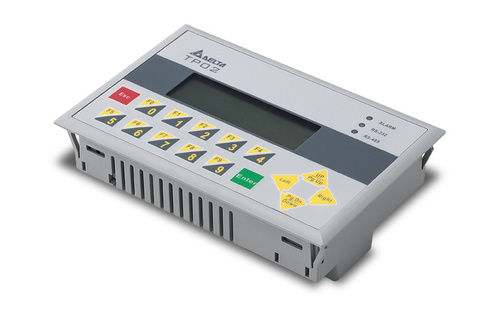
Delta Display TP02G-AL1
Automation Grade : Automatic
Connectivity Type : Wired
Power : 24V DC
Mounting Type : Panel Mount
Warranty : 1 Year
Application : Industrial Automation
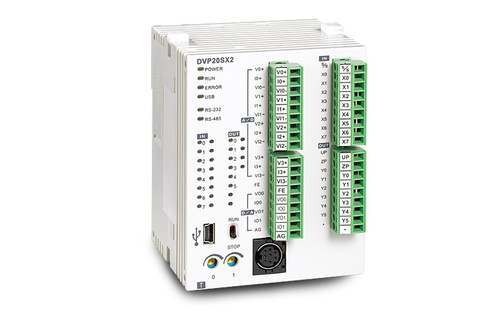
Delta PLC DVP20SX2
Automation Grade : High
Connectivity Type : Wired
Power : 5W
Mounting Type : DIN Rail
Warranty : 2 years
Application : Industrial automation

TECHNOVISION CONTROL SYSTEMS PVT. LTD.
GST : 27AADCT3013C1ZX
GST : 27AADCT3013C1ZX
202, Ambience Park, DanaBunder, Behind Lalji Mulji, Sector-19, Vashi, Navi Mumbai - 400703, Maharashtra, India
Phone :08045813031
Ms. Prachi
(Sales Coordination)
Mobile :08045813031
Mr. Sagar Pramod Sadavarte
(Director)
Mobile :08045813031
 Send Inquiry
- AC Servo motors
- AC Servo Drives
- PLC HMI Controllers
- Motion Controllers
- Programmable Logic Controllers
- CNC Controllers
- Control Panels
- Stepper motors
- Stepper Drives
- Panasonic GearHead
- Brushed DC Servo motors
- Brushed DC Servo Drives
- Brushless DC Driver for motor
- BLDC Servo motors
- PANASONIC Geared Motors
- Panasonic Sensors
- Integration Projects
- SCADA
- DC Thyristorised Drive
- Digital DC Drive
- Planetary gearbox
- Fatek PLC
- TCSPL
 Send Inquiry
 Send SMS
TECHNOVISION CONTROL SYSTEMS PVT. LTD.
All Rights Reserved.(Terms of Use)
Developed and Managed by Infocom Network Private Limited.
Developed and Managed by Infocom Network Private Limited.

